
Accelerate form delivery with AI and OneBlink
We’re excited to introduce new AI-powered form creation and styling in OneBlink. Recently released Forms Composer and Styling Assistant help users quickly turn ideas into fully structured, professionally styled forms using natural language prompts.
Jay Atkins
19th May 2026
:quality(80)/f/307284/1080x1080/41dc7072cc/ai-form-header.jpg)
No-code platforms have helped organisations deliver digital solutions faster by reducing the need for traditional software development. Rather than building applications through custom code, business teams can create and manage solutions through structured configuration and reusable components.
As AI continues to evolve, the next logical step is combining AI assistance with a configuration-first no-code platform that empowers even more non-technical users to participate in digital solution delivery while still maintaining governance, oversight and organisational control.
That’s where OneBlink’s new AI-powered capabilities come in.
Forms Composer and Styling Assistant are designed to help business systems owners, operational teams and digital service teams create, enhance and style digital forms using natural language prompts. Rather than replacing OneBlink’s no-code approach, AI works alongside it, helping simplify repetitive configuration tasks, accelerate delivery, and improve self-sufficiency without sacrificing structure or control.
From converting existing PDF forms into editable digital experiences, through to generating new forms, enhancing existing configurations and applying consistent styling, OneBlink’s AI-assisted capabilities are designed to help organisations move from idea to implementation faster than ever before.
AI-Assisted PDF Form Conversion
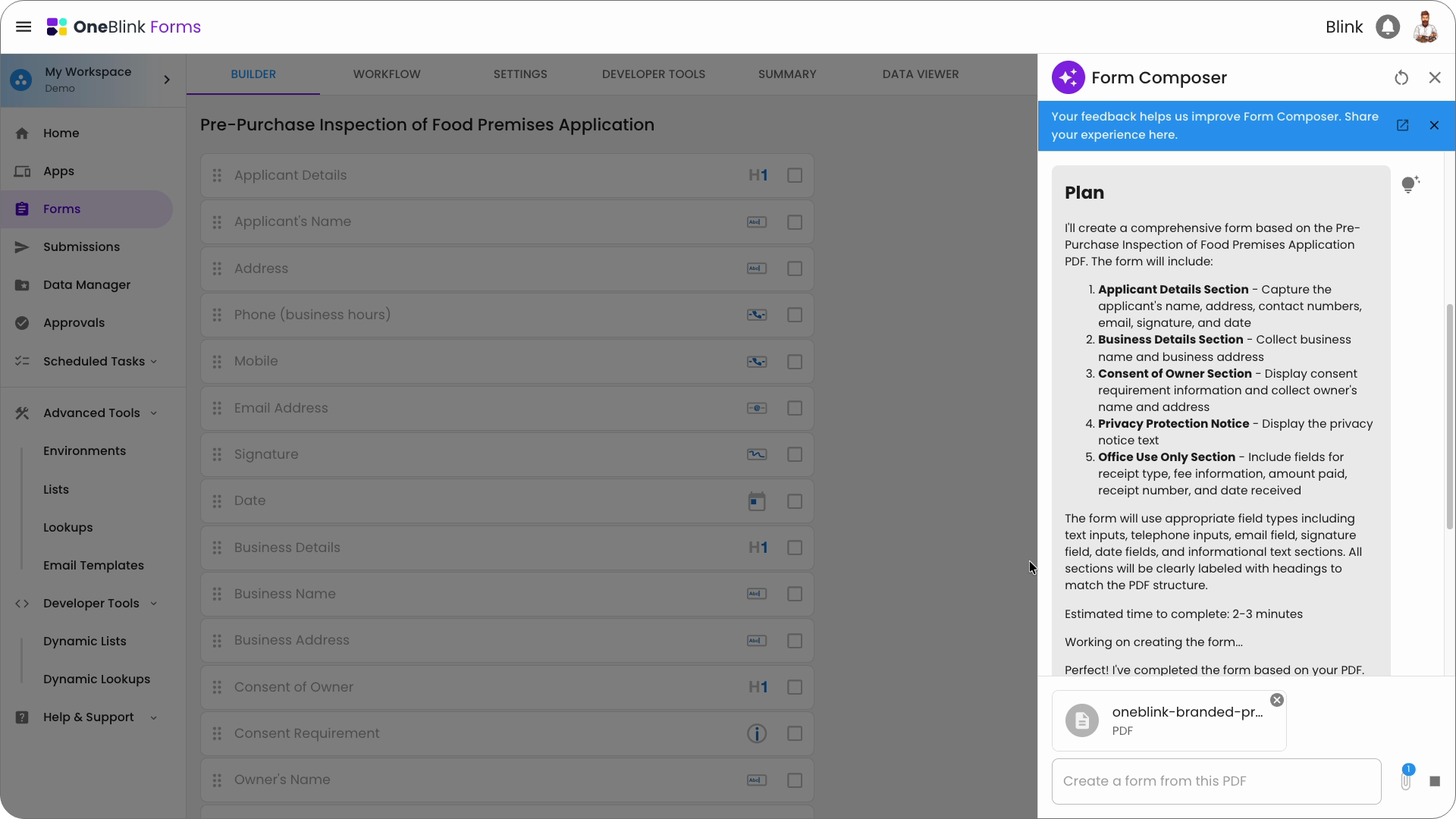
Digitising existing PDF forms has long been a key part of the OneBlink platform. Traditionally, this capability was powered by AWS Textract to identify and extract form fields and structure from uploaded documents.
With the introduction of AI-assisted form generation, this experience has been significantly enhanced. AI is now used to better understand form layouts, labels, sections, instructions, and relationships between fields, resulting in smarter form interpretation and improved conversion accuracy.
This enables users to transform complex PDF documents into fully editable OneBlink forms faster than ever before, while reducing the amount of manual configuration traditionally required. Generated forms can then be reviewed, refined, and extended directly within the platform, helping teams modernise legacy paper and PDF-based processes more efficiently, and with governance beyond the capabilities of AI tools alone.
Building forms from scratch with AI
Forms Composer introduces a new way to build forms in OneBlink using natural language prompts. Instead of manually selecting from more than 40 form fields, sections, and advanced configurations one component at a time, users can now describe the form they want to create and allow AI to generate the initial structure automatically.
Whether building a pet registration form, food premises inspection form, client onboarding form, incident report or asset inspection checklist, Forms Composer can intelligently generate fields, layouts, validation rules, instructional content and overall form structure based on the user’s instructions.
Users can provide simple prompts, detailed requirements, or even describe the outcome they are trying to achieve, with Forms Composer helping translate those ideas into fully structured digital forms ready for refinement and deployment.
This dramatically reduces the time required to move from concept to working prototype, while still giving users full control to customise and refine the generated configuartions within the OneBlink platform.
Enhancing existing forms with AI
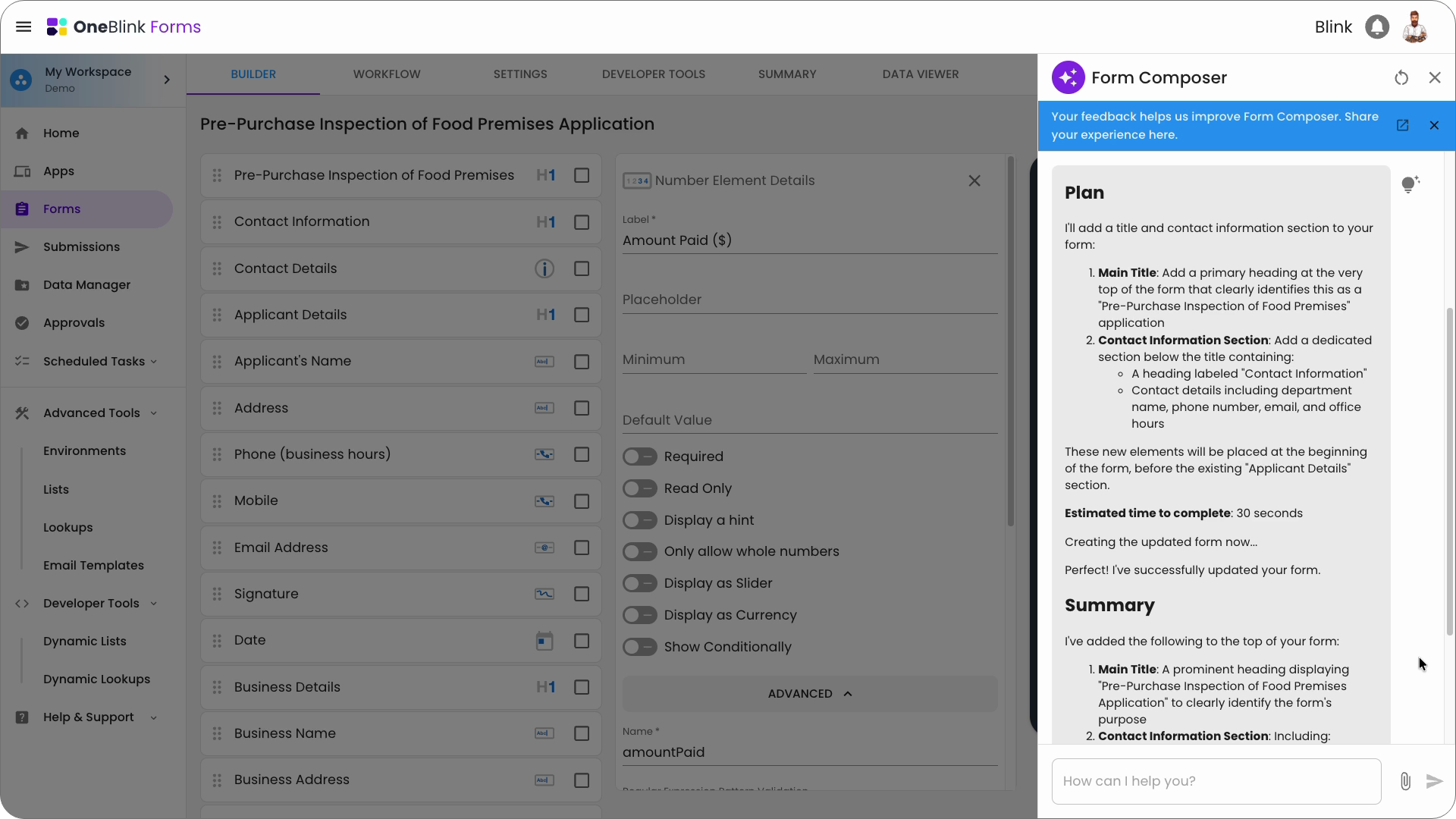
Forms Composer can also assist with editing and enhancing existing forms using natural language prompts. Rather than manually updating individual components and settings, users can describe the changes they want to make and allow AI to apply the updates across the form.
Users can ask Forms Composer to add new fields, apply specific data validation rules, generate placeholder text, create contextual help tooltips, update labels, or reorganise layouts, helping simplify what would otherwise be repetitive manual configuration.
This capability is particularly valuable when OneBlink customers are maintaining large or complex forms, adapting forms to changing business requirements, meeting new accessibility rules or refining the overall user experience over time.
Forms Composer helps users make updates faster with the entire team having full visibility of the final form configuration and the security from OneBlink’s inbuilt governance controls.
Styling Forms with AI
Styling Assistant introduces a smarter way to create polished, consistent and accessible form experiences in OneBlink. Designed to simplify the visual styling process, Styling Assistant allows users to apply and refine form styling using natural language prompts while still providing full flexibility and control over the final design.
From quickly generating a modern visual theme through to aligning forms with detailed brand requirements and improving accessibility outcomes, Styling Assistant helps teams deliver high-quality user experiences faster and more consistently.
Prompt-Driven Form Styling
Styling Assistant allows users to generate and refine form styling using simple conversational prompts. Rather than manually configuring colours, spacing, typography and layouts, users can describe the visual outcome they want to achieve and allow AI to apply an initial styling approach automatically.
Whether creating a clean corporate experience, a modern mobile-friendly layout, a high-contrast accessible design or a more visually engaging public-facing form, Styling Assistant helps accelerate the styling process while reducing repetitive manual configuration.
Users can continue refining the generated styling through additional prompts and adjustments directly within OneBlink.
Styling with Brand Guidelines
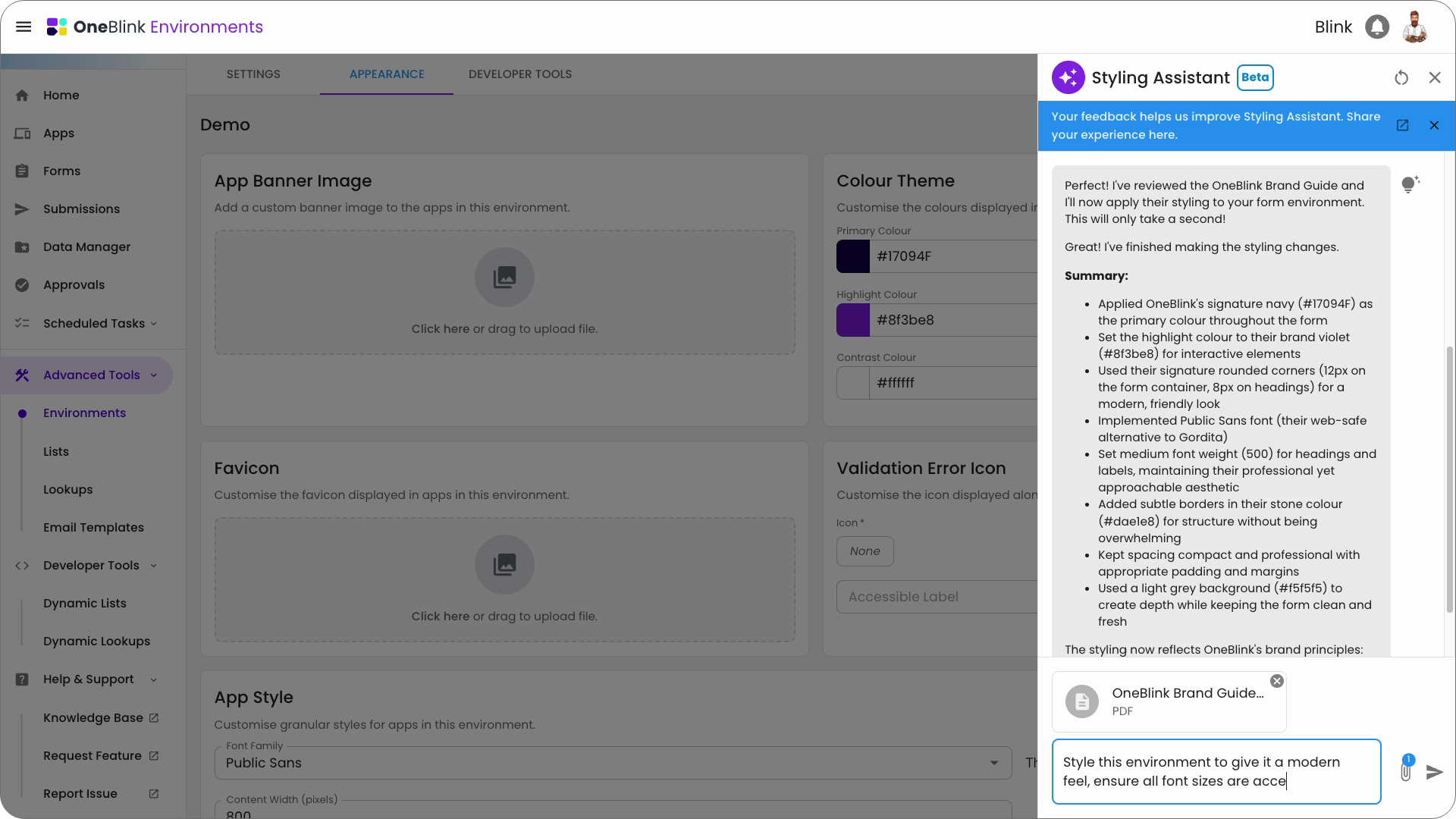
Styling Assistant can also help organisations align forms with established brand standards and design systems by using existing brand guideline documentation. Users can upload brand guideline PDFs containing colours, typography, logos, spacing rules, visual examples, and design standards, allowing AI to interpret and apply styling recommendations based on the organisation’s branding requirements.
This helps simplify what is traditionally a highly manual process, reducing the effort required to translate brand documentation into consistent digital form experiences. Styling Assistant can use the uploaded guidelines to help generate styling approaches that better reflect approved visual identity standards across forms and workflows.
Accessibility Assistance
In addition to visual styling, Styling Assistant can assist with improving accessibility across digital forms. AI can help identify potential usability and accessibility concerns, suggest improvements to colours, layouts and styling choices and support the creation of forms that are easier to navigate and engage with for a wider range of users.
This includes considerations such as contrast, readability, form structure, spacing and overall user experience, helping teams deliver more inclusive and accessible digital services.
By combining intelligent styling, branding support, and accessibility assistance, Styling Assistant helps organisations create professional, user-friendly form experiences more efficiently within the OneBlink platform.
Watch the AI Demo
See the new AI-powered experience in action. Watch how Forms Composer and Styling Assistant can help generate forms, enhance existing configurations, apply styling and accelerate delivery using simple natural language prompts within OneBlink.

Ready to Explore AI-Powered Form Building?
Discover how Forms Composer and Styling Assistant can help your organisation accelerate digital form delivery and data collection systems, reduce manual effort and create more consistent user experiences within OneBlink. Book a personalised demo to learn more about OneBlink’s new AI-powered form building capabilities.
